
How to Buy Cryptocurrencies via WEEX P2P?

 Prefer us on Google

Below is a step-by-step guide on how to buy cryptocurrencies via WEEX P2P. Follow these steps to ensure a safe, efficient, and smooth transaction process.
For Mobile Devices:
Step 1: Access the P2P trading page
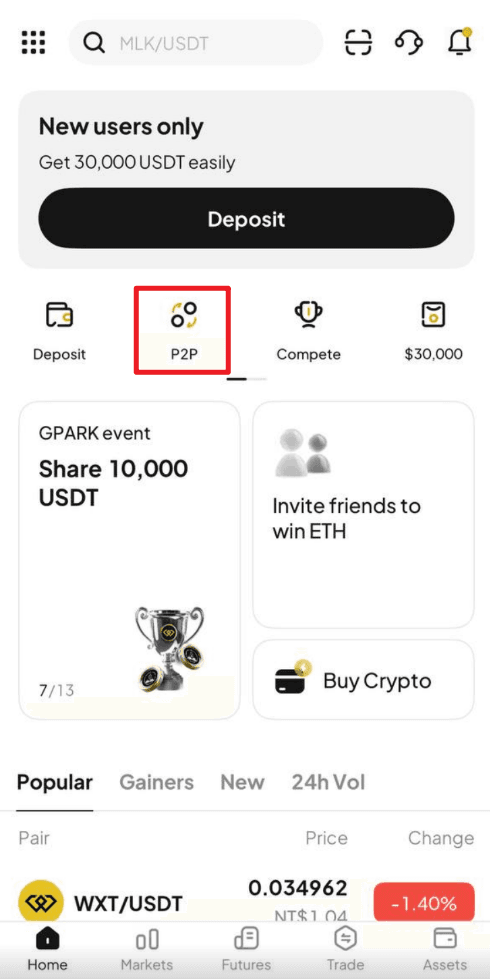
On the WEEX App, Click "P2P " from the front page.
Step 2: Set up or confirm your payment method
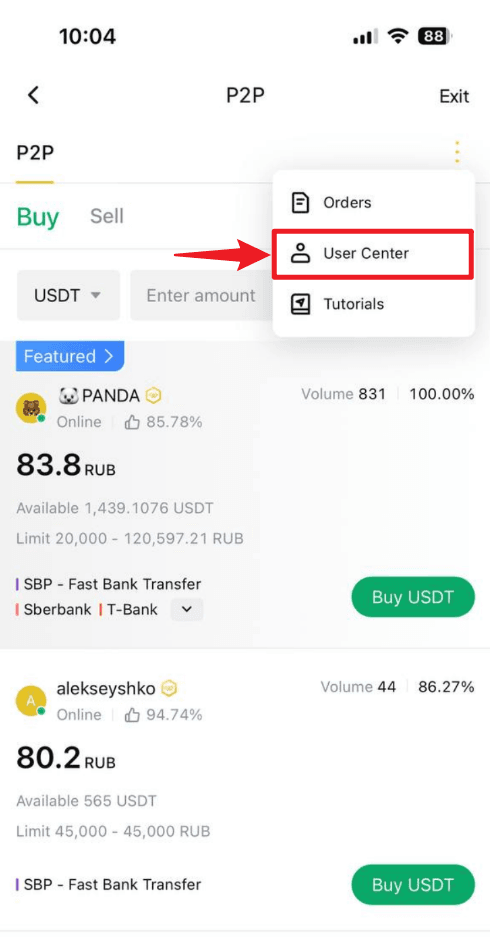
- Navigate to the "P2P management" page: Click the "More" (three-dot icon) in the top right corner, then select "User center."
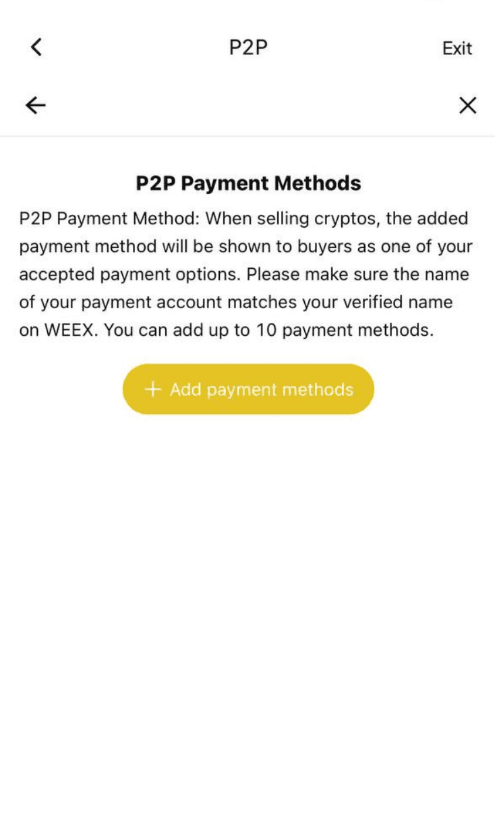
- Under "P2P payment method", click "Add payment method".
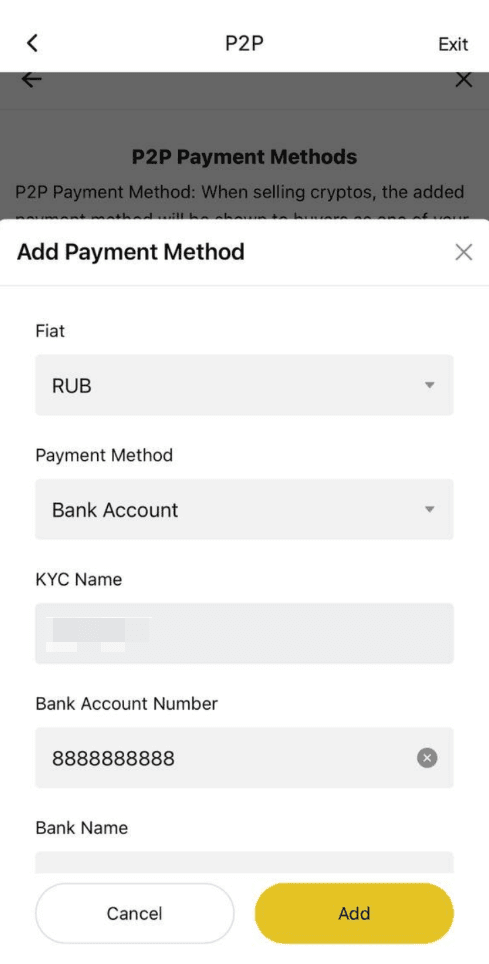
- Fill in your preferred payment details. Please ensure that the account name you provided matches the name used for your KYC verification on WEEX.
Step 3: Select a seller and place your order
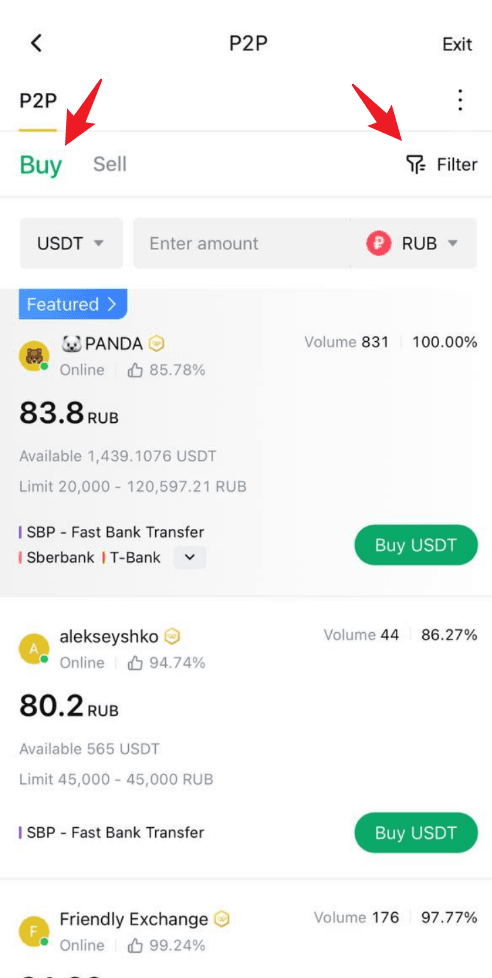
- On the P2P page, click the "Buy" tab and select the cryptocurrency you wish to buy, such as USDT, BTC, etc.
- Use the filters to set your trading preferences: - Select the cryptocurrency you want to buy - Enter the amount of fiat currency you'd like to use - Choose your preferred payment method
- Browse the list of available sellers. Focus on these key details: - Price per unit of crypto - Transaction limits - Seller’s order completion rate
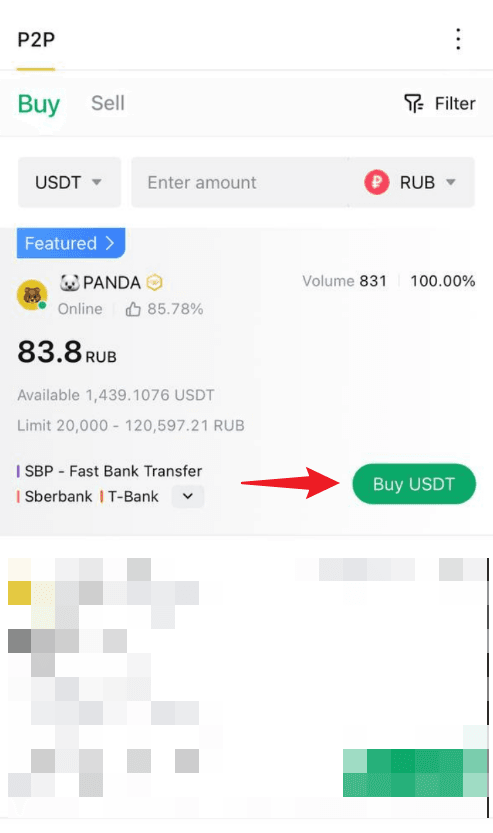
- Once you’ve found a suitable seller, click "Buy" next to their listing to initiate the order.
Step 5: Make the payment
- Transfer the specified amount to the seller’s account, following the payment details shown on the page.
- Payment notes: - Ensure the payment amount exactly matches the order amount - Double-check the seller’s information before completing the payment - Avoid using sensitive words like "cryptocurrency", "BTC", "P2P", or "WEEX" in the payment notes
- After completing the payment, return to the order page and click "Transfer Completed, Notify Seller".
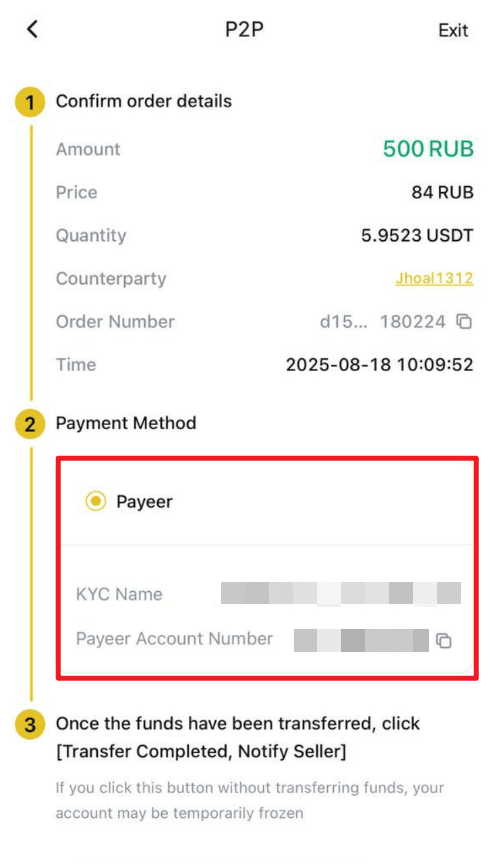
- Important notes: - Always use the payment method specified by the seller to complete the transaction - Do not click "Cancel order" before receiving a refund from the seller - Do not click "Transfer Completed, Notify Seller" until the payment is fully completed
Step 6: Receive the cryptocurrency
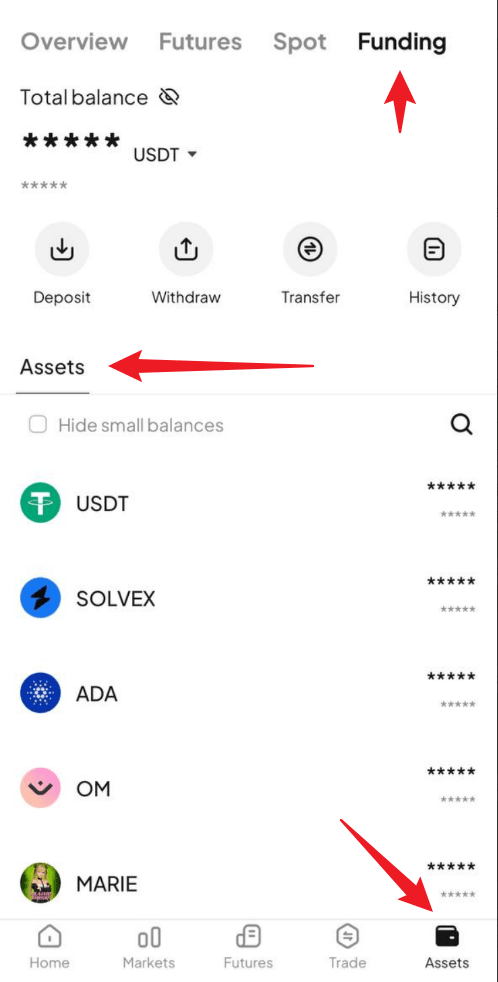
- Once the seller confirms receipt of payment, the cryptocurrency will be released to your WEEX funding account.
- You can then go directly to your Funding Account to view your purchased crypto assets.
For Web Users:
Step 1: Access the P2P trading page
On the WEEX website, go to the trading page by selecting "P2P trading" from the navigation bar.
Step 2: Set up or confirm your payment method
- Navigate to the "P2P management" page: Click the "More" (three-dot icon) in the top right corner, then select "User center."
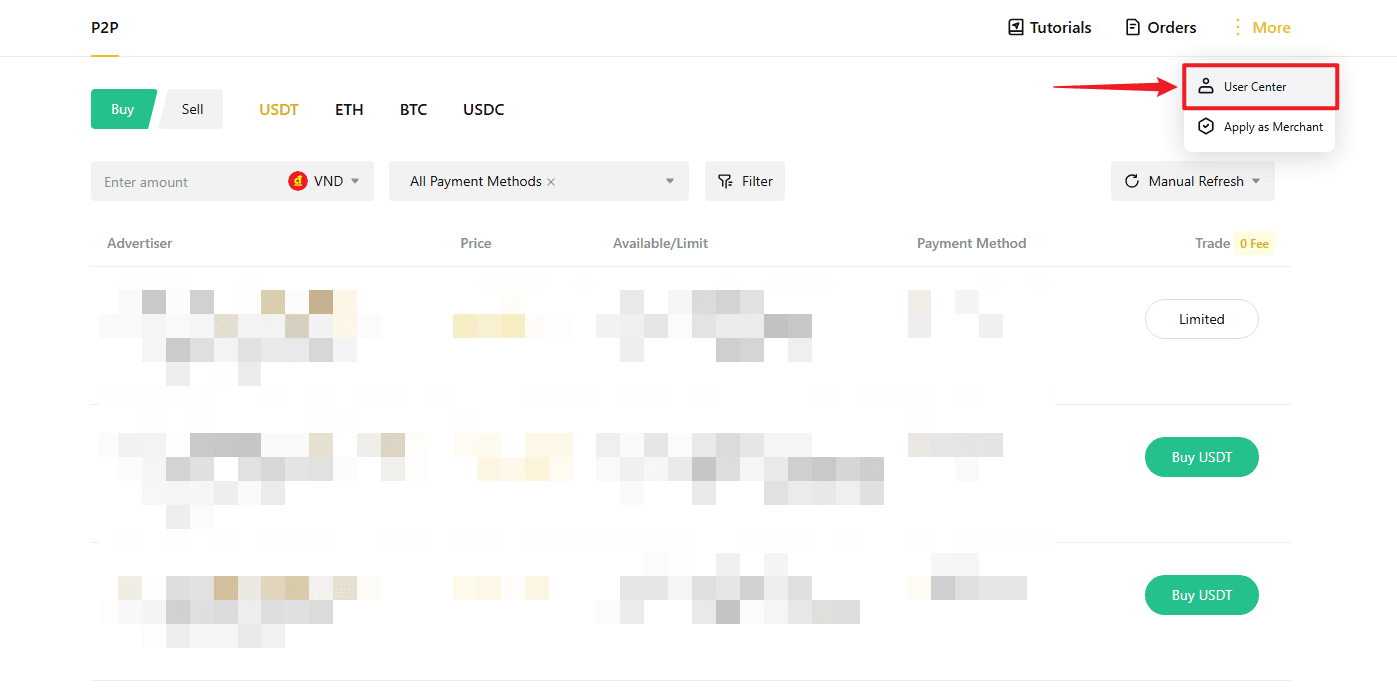
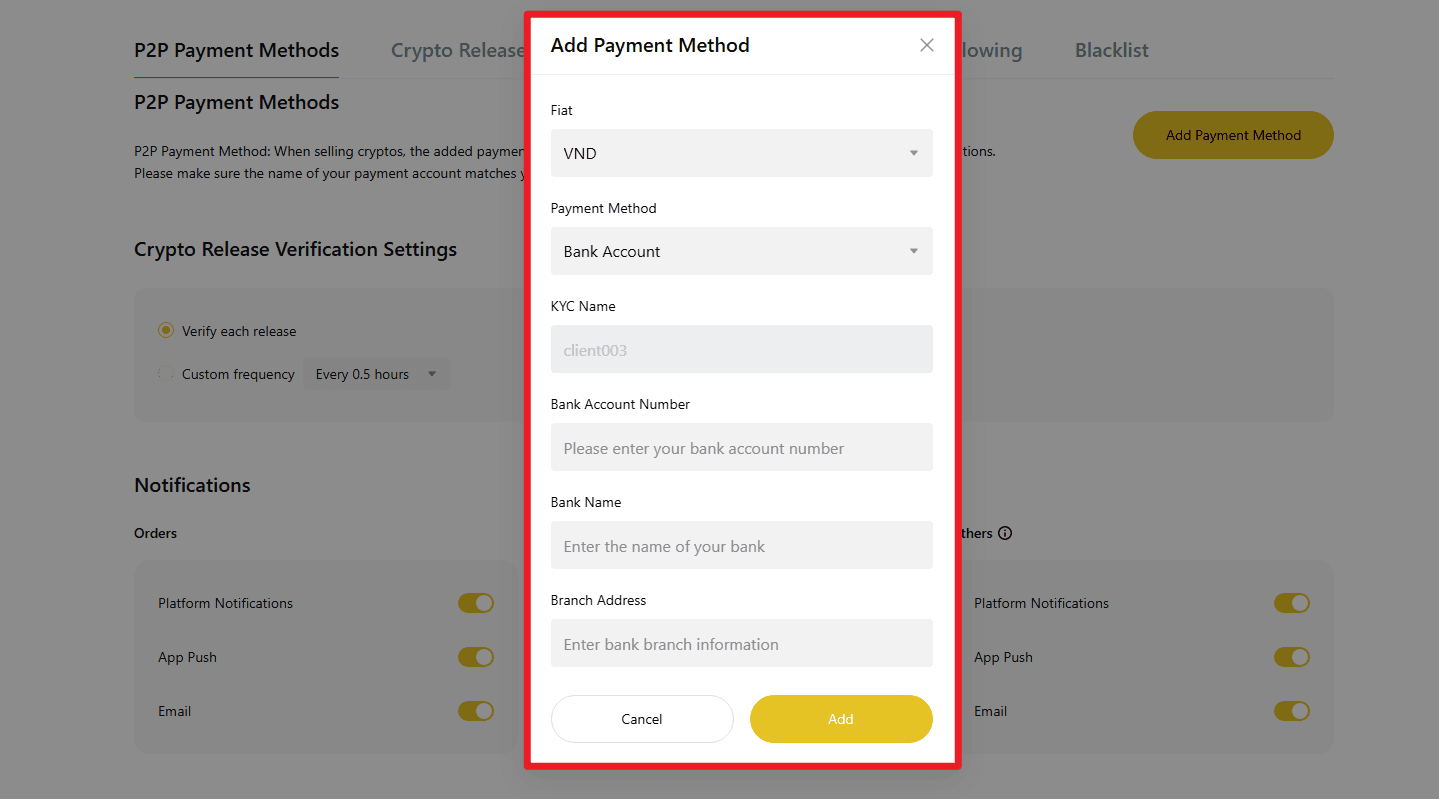
- Under "P2P payment method", click "Add payment method".

- Fill in your preferred payment details.
Please ensure that the account name you provided matches the name used for your KYC verification on WEEX.
Step 3: Select a seller and place your order
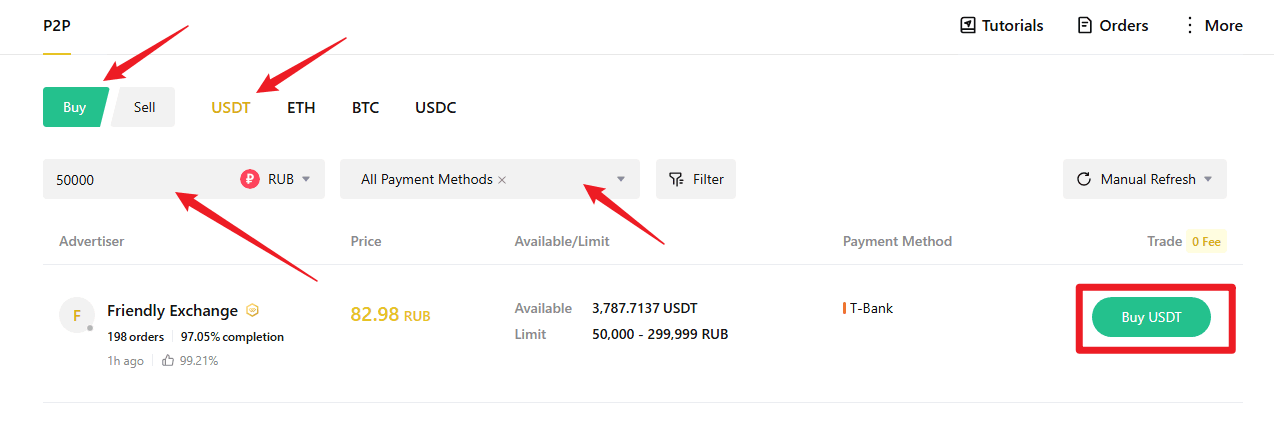
- On the P2P page, click the "Buy" tab and select the cryptocurrency you wish to buy, such as USDT, BTC, etc.
- Use the filters to set your trading preferences: - Select the cryptocurrency you want to buy - Enter the amount of fiat currency you'd like to use - Choose your preferred payment method
- Browse the list of available sellers. Focus on these key details: - Price per unit of crypto - Transaction limits - Seller’s order completion rate
- Once you’ve found a suitable seller, click "Buy" next to their listing to initiate the order.
Step 4: Enter order details and confirm
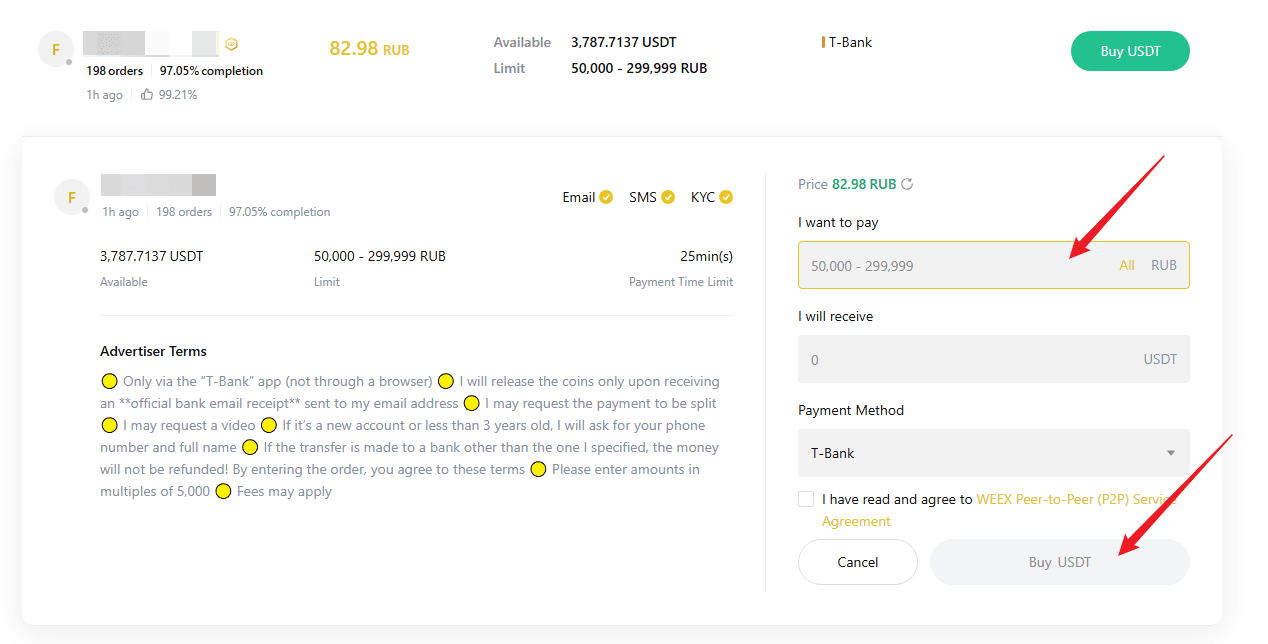
- Enter the amount of cryptocurrency you want to buy or enter the amount based on fiat currency.
- Review the transaction limits and order instructions to ensure everything meets your expectations.
- Once confirmed, click "Buy" to finalize your order.
Step 5: Make the payment
- Transfer the specified amount to the seller’s account, following the payment details shown on the page.
- Payment notes: - Ensure the payment amount exactly matches the order amount - Double-check the seller’s information before completing the payment - Avoid using sensitive words like "cryptocurrency", "BTC", "P2P", or "WEEX" in the payment
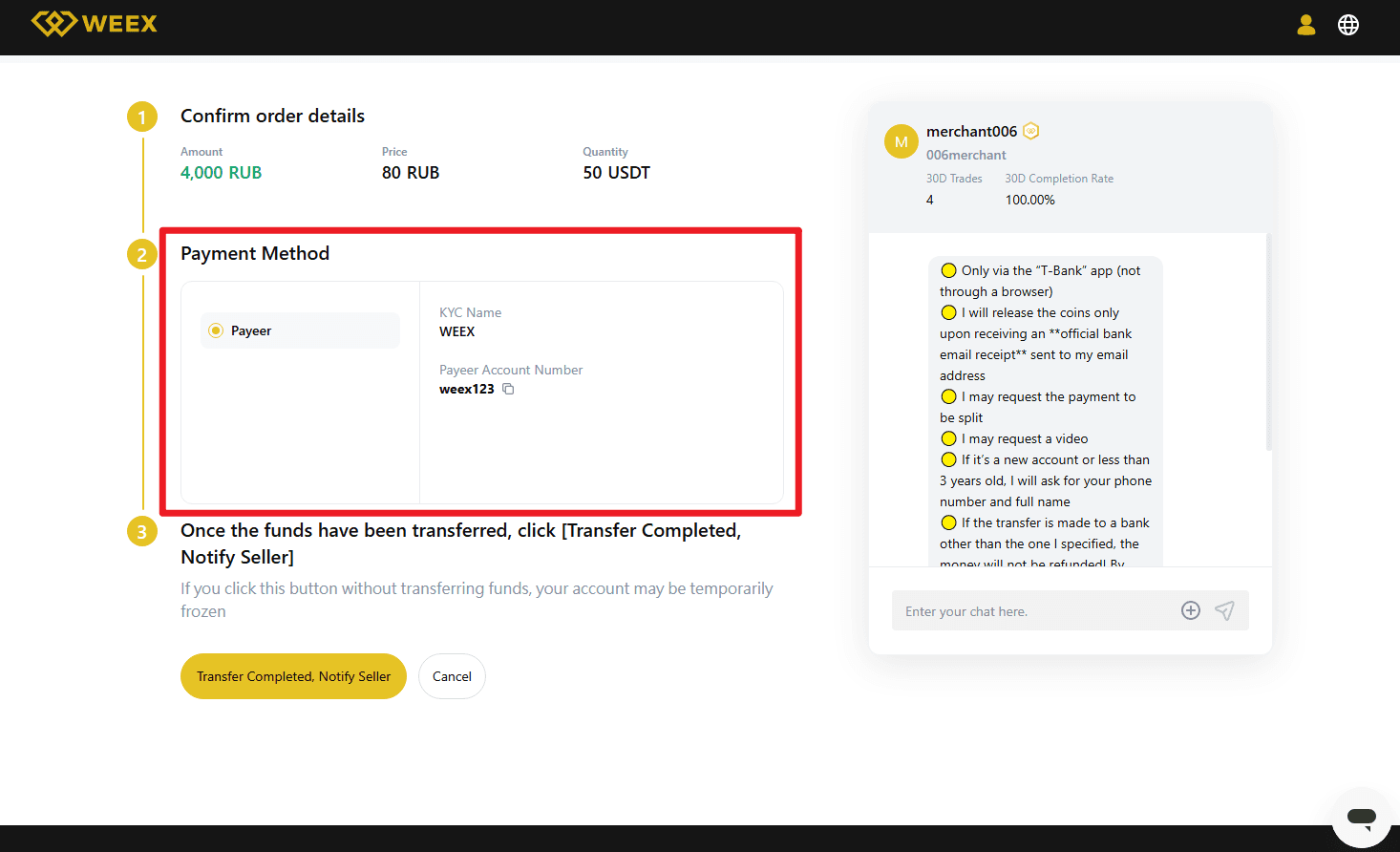
- After completing the payment, return to the order page and click "Transfer Completed, Notify Seller".
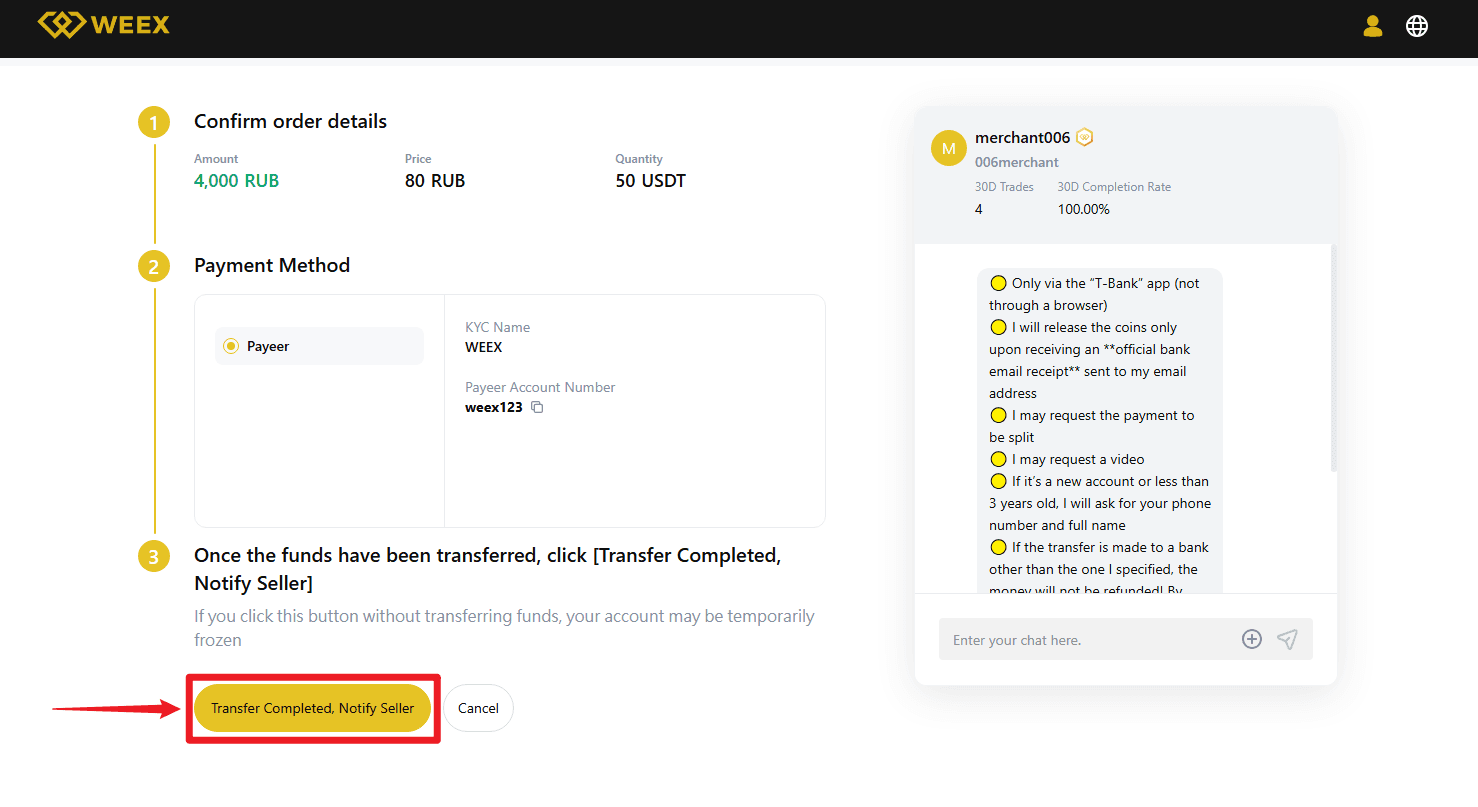
- Important notes: - Always use the payment method specified by the seller to complete the transaction - Do not click "Cancel order" before receiving a refund from the seller - Do not click "Transfer Completed, Notify Seller" until the payment is fully completed
Step 6: Receive the cryptocurrency
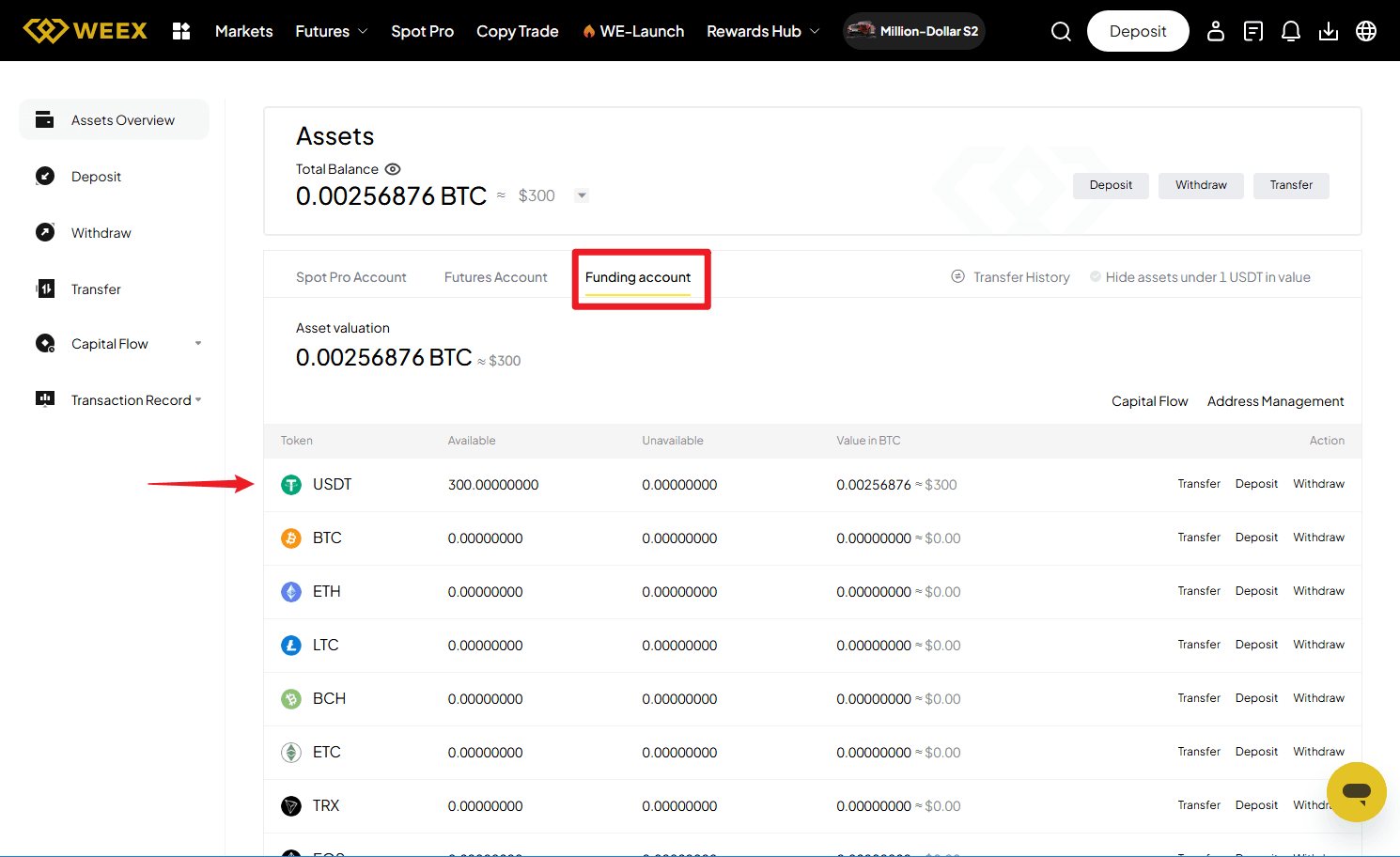
- Once the seller confirms receipt of payment, the cryptocurrency will be released to your WEEX funding account.
- You can then go directly to your Funding Account to view your purchased crypto assets.
-- Price
This content is provided for general informational purposes only and doesn't constitute financial, investment, legal, or tax advice. Any events, rewards, online promotions, or related information mentioned herein should not be considered a recommendation, solicitation, or invitation to purchase, sell, trade, or otherwise deal in any crypto assets. Crypto assets are highly volatile and may result in loss. The availability of WEEX services, products, and related events may vary by region. You are responsible for ensuring that your participation is in accordance with applicable local laws and regulations.
You may also like
Crypto News API for AI Agents: What the WEEX Endpoints Return

WEEX Crypto Gift: The Perfect Gift for Every Crypto Lover in 2025
What Should I Do If My KYC Verification Failed on WEEX?
Are There Any Fees for Deposits or Withdrawals On WEEX?
What Are the Trading Fees on WEEX?
What Are the WEEX Withdrawal Fees?
How Can I Reduce My Trading Fees?
Guide to Spot and Futures Trading Fees on WEEX
What Are Spot Stock Tokens? How Synthetic Stock Trading Works
Should I Buy PONS Coin? Sep 2026 Price Prediction & Guide
Can PONS Reach $1? PONS Coin Price Analysis After WEEX
Can PONS Reach $1? PONS Coin Price Analysis After WEEX

What Is WEEX Stock Spot Trading? A Beginner's Guide to US Stock Trading with USDT
"牛来" Niu Lai Meme Coin Just Hit a New $120M High: Why This Rally Has Lasted Weeks, Not Days
SpaceX Stock Price Holds Near $141: Why Isn't a $100 Billion Spaceport Plan Moving It?
MU Stock Price Fell After Trump Praised Micron: What Actually Happened
"我的女友景甜" Days Later: What Happened to the Viral Meme Coin
XST Coin Price Bounced 19% Off a New Low in Hours: Is This the Bottom or Just Noise?
Is NVDA Stock Overvalued After Record Q2 Earnings?
NVDA Stock Pulls Back After Earnings: Is $250 Still Next?
WEEX Promo Code and Sign-Up Bonus: What You Need to Know

WEEX Welcome Bonus Explained: How New User Rewards Work
WEEX Affiliate Program: How to Join and Track Commission
WEEX Referral Code Guide: How Tracking and Verification Work
How to Get WEEX Referral Commission: Rules and Tracking
Salesforce Stock Price Targets Are Rising Fast: What Wall Street Actually Sees
MRVL Stock Price Target: Why Options Traders Bet on $300 Before Earnings
Marvell Stock (MRVL) Beat Earnings and Raised Guidance: Why Did It Fall Anyway?
What Is SUE Coin? Is a Dump Coming After Its 150% Pump?
What Is the WEEX Mini App? A Lightweight Way to Trade Inside Telegram
Crypto News API for AI Agents: What the WEEX Endpoints Return
WEEX Crypto Gift: The Perfect Gift for Every Crypto Lover in 2025
What Should I Do If My KYC Verification Failed on WEEX?
Are There Any Fees for Deposits or Withdrawals On WEEX?
What Are the Trading Fees on WEEX?
What Are the WEEX Withdrawal Fees?
Contents
Popular coins
Latest articles





