
What are Trigger Orders, TP/SL, and Trailing Stops? A Beginner's Guide to WEEX Order Functions

When you start futures trading, you will encounter terms like "TP/SL," "Trigger Order," and "Trailing Stop." While all of these are functions that "automatically place orders when conditions are met," they each serve a different purpose. This article explains these three functions using specific numbers.
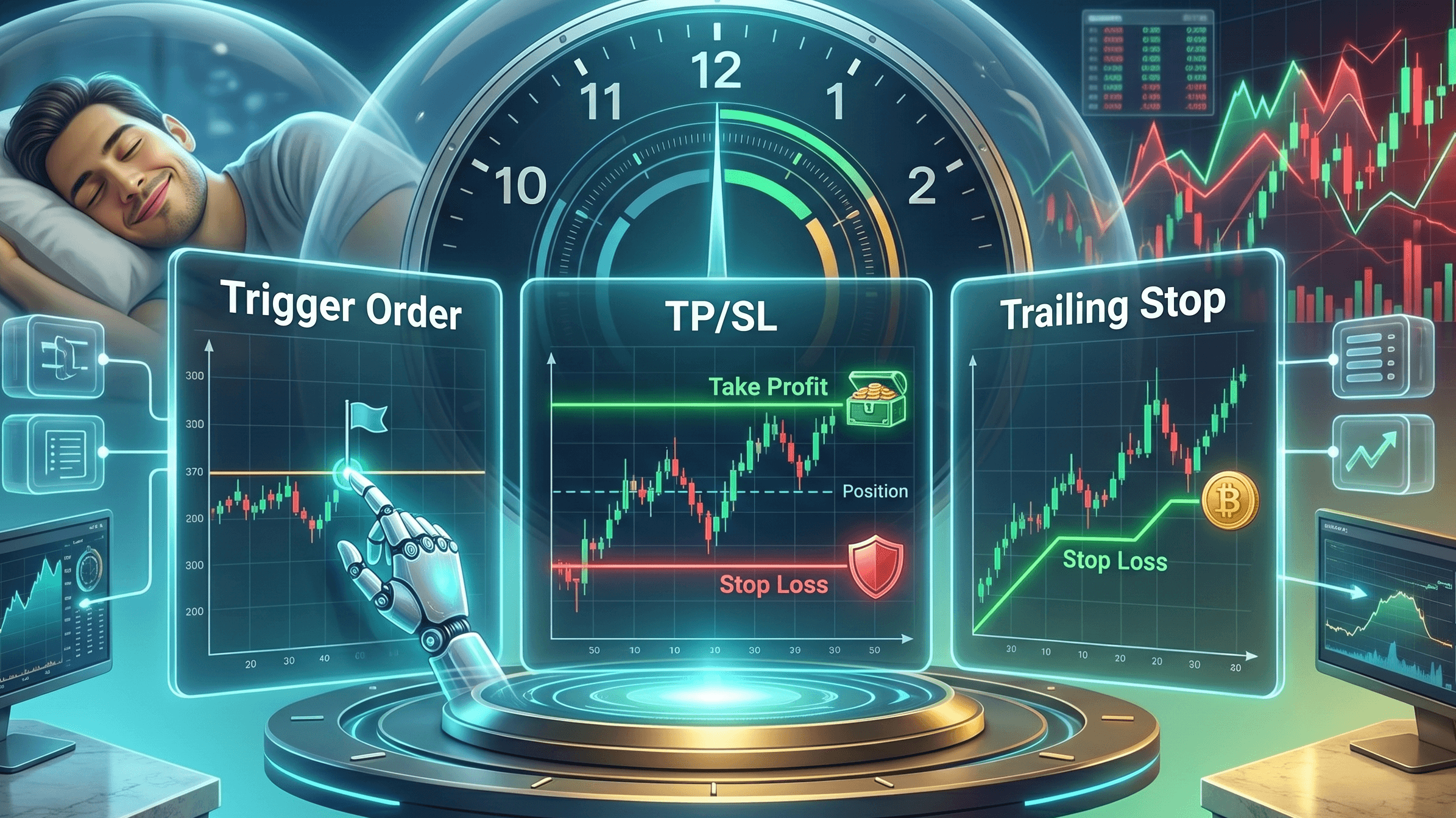
Why is "Automatic Ordering" Necessary?
Cryptocurrency prices fluctuate 24 hours a day, 365 days a year. If a sudden drop occurs while you are sleeping or working and you haven't set an SL (Stop Loss), your unrealized losses will continue to grow, potentially leading to forced liquidation (stop-loss) in the worst-case scenario. By setting conditions in advance—such as "if the price moves to this level, automatically place this order"—you can trade with discipline without having to watch the charts constantly.
Trigger Order: Automatically Open a Position at a Specific Price
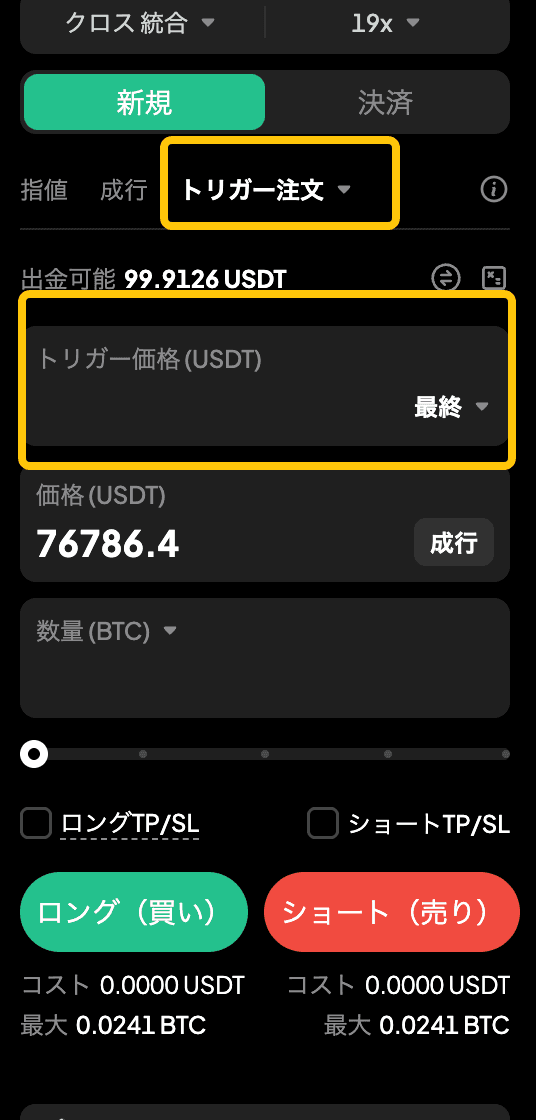
A Trigger Order is a function that automatically places a new order when the market price reaches a specified trigger price. It is used to automate entries when you do not currently hold a position.
If the current BTC price is 90,000 USDT and you want to "open a long position because you believe it is an uptrend if it exceeds 95,000 USDT," you can set the trigger price to 95,000 USDT, and the order will be placed automatically even if you aren't looking at the chart.
Caution: When setting a Limit Order, if you do not set the order price (limit price) slightly higher than the trigger price (for a buy order), the order may be "skipped" and not executed even if the trigger is activated. If you want to ensure execution, choosing a Market Order is simpler.
TP/SL: Take Profit Here, Stop Loss There
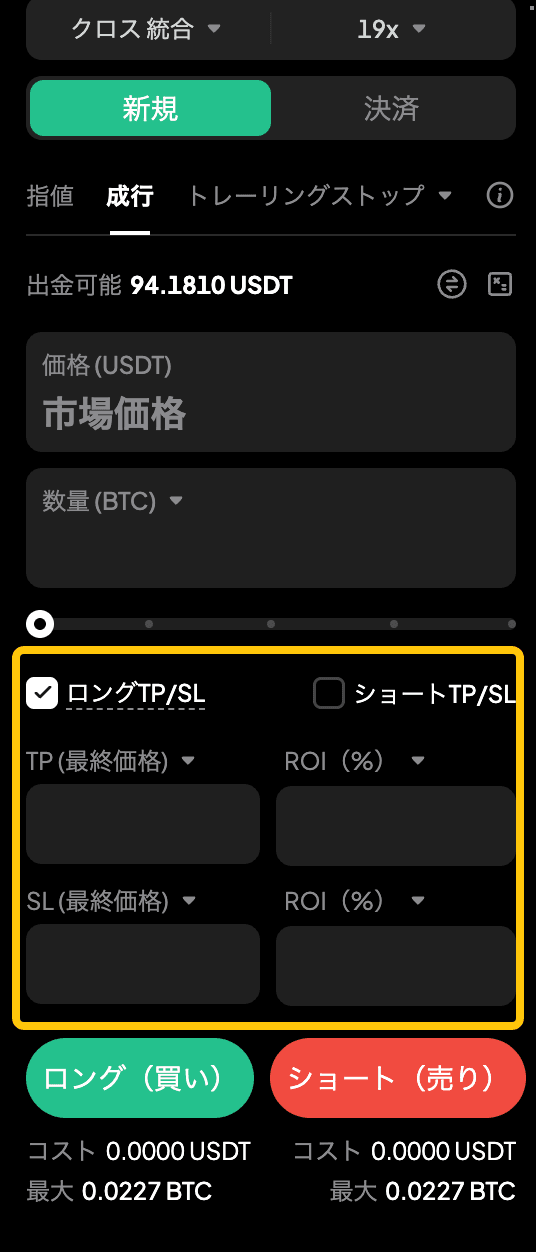
TP (Take Profit) and SL (Stop Loss) are functions that automatically close a position when the price reaches a specified level. TP/SL is used only to "close" positions. Use Trigger Orders for new entries.
There are two times you can set these. One is by checking "Long TP/SL" or "Short TP/SL" on the order screen to set them simultaneously with your order. The other is by adding or changing them from the "Positions" tab after holding a position. If you opened a long position, you can only set a Long TP/SL; if you opened a short position, you can only set a Short TP/SL.
TP and SL can be specified by price (Last Price or Mark Price) or by ROI (Return on Investment, %). If you want to "take profit when it reaches 10%," entering the ROI is more intuitive. As an example, if you went long on BTC at 90,000 USDT, setting a TP at 98,000 USDT and an SL at 85,000 USDT ensures that if the market moves while you are sleeping, it will automatically respond according to your pre-determined rules.

Trailing Stop: Automatically Adjust While Chasing Profits
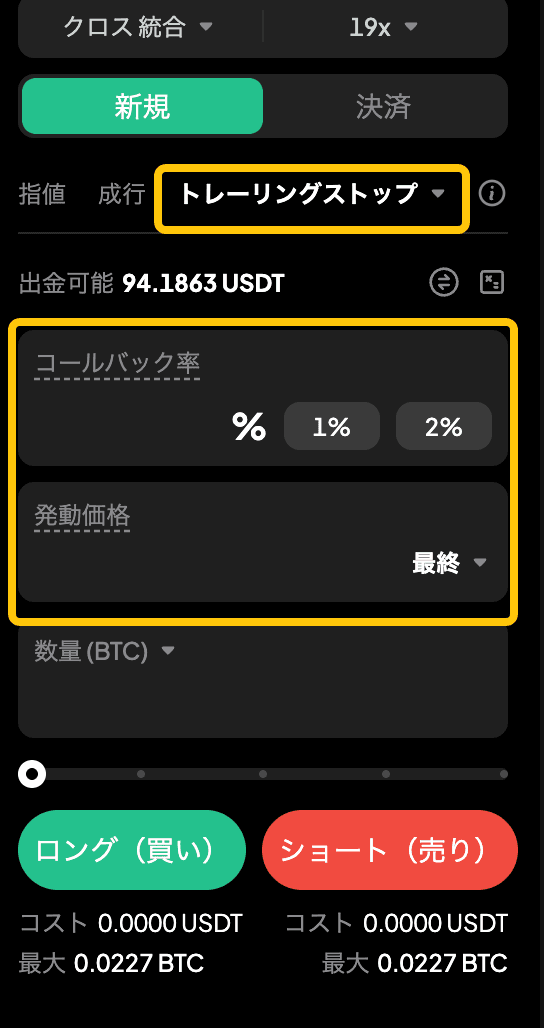
Unlike TP/SL, a Trailing Stop is an order type set when opening a new position. By setting a "Callback Rate (%)", a market order is automatically executed once the price reverses from the highest price reached after tracking began by the callback rate. You can enter any desired value for the callback rate.
If you go long on BTC at 90,000 USDT and set a callback rate of 3%, if the price rises to 100,000 USDT, the peak is updated, and it will automatically close at 97,000 USDT, which is a 3% drop from that peak. This allows you to ride an uptrend, chase profits, and lock them in as soon as the trend reverses.
Activation Price: You can set this optionally. If set, tracking begins once that price is reached. If not set, the price at the time of the order automatically becomes the trigger price.
Last vs. Mark: You can choose "Last Price" or "Mark Price" as the basis for the activation price. This selection applies to both the trigger price and the activation price. The Last Price is suitable for short-term trading, while the Mark Price is better for high leverage or medium-to-long-term holding as it avoids accidental activation due to price spikes.
Suitable Market Conditions: This is effective in markets with clear trends. In range-bound markets where prices repeatedly move up and down, it may trigger on small reversals, so a fixed TP/SL is more suitable.
Summary of How to Use the Three Functions
| Scenario | Function to Use |
| "I want to buy when it hits this price" | Trigger Order (Automatically opens a position when conditions are met) |
| "I want to take profit/stop loss here" | TP/SL (Set at order time or after holding; specified by price or ROI %) |
| "I want to ride the uptrend and chase profits" | Trailing Stop (Set at new entry; automatically closes by following the peak) |
| "I want to automate everything from entry to exit" | Open position with Trigger Order, set exit line with TP/SL |
Conclusion
Trigger Orders, TP/SL, and Trailing Stops are functions for creating mechanisms that work automatically without you having to watch the charts constantly. We recommend starting by automating entries with Trigger Orders and setting profit targets and loss limits with TP/SL. Try testing these settings with WEEX's demo trading feature before moving on to real trading.
Frequently Asked Questions
Q. What is the difference between a Trigger Order and TP/SL?
A Trigger Order is an automatic order for "opening" a position, while TP/SL is an automatic order for "closing" a position. "Buy when it hits 95,000 USDT" is a Trigger Order, while "Sell when it hits 98,000 USDT after buying" is a TP. TP/SL cannot be used alone when you have no position, but it can be set using the checkboxes at the time of the order.
Q. What happens if I don't set an SL?
You will either have to close the position manually, or it will be forcibly liquidated (stop-loss) when your margin is exhausted. We strongly recommend setting at least an SL if you are sleeping or cannot watch the charts for a long time.
Q. How do I choose between a Trailing Stop and TP/SL?
Use TP/SL when you want to fix your exit price, and use a Trailing Stop when you want to ride a trend and increase your profits. A Trailing Stop also differs from TP/SL in that it is set when opening a new position. Because it is easy to trigger on small reversals in range-bound markets, it is better suited for trending markets with a clear direction.

Disclaimer
WEEX and its affiliates provide digital asset exchange services, including derivatives and margin trading, only to eligible users in legally permitted regions. This content is for general information purposes only and does not constitute investment advice. Please consult with a professional before trading. Cryptocurrency trading is high-risk, and you may lose all of your invested funds. By using WEEX services, you are deemed to have agreed to all relevant risks, the Terms of Service, and the Risk Disclosure. Please invest within your means and at your own discretion.