
WEEX: Position Take Profit and Stop Loss Feature

 Prefer us on Google


In futures trading, the real challenge is usually how to exit, not when to enter. Delayed stop-losses, giving back unrealized gains, and uncontrolled risk after scaling in—these are the main drivers of drawdowns.
The Position Take-Profit / Stop-Loss feature now lives and running stably on WEEX lets you predefine both profit capture and maximum loss for an entire position in one go. Once triggered, it executes a full position market close automatically—reducing emotional interference, improving execution certainty during sharp volatility, and turning risk–reward into measurable, reviewable data.
This article will clearly and quickly cover: what it is, when to use it, its core benefits, how to set it properly, plus common FAQs.
What Is Position Take-Profit / Stop-Loss?
Position Take-Profit / Stop-Loss sets exit conditions for the entire current futures position. After you define a take-profit price and/or a stop-loss price for a position, once market price hits a trigger, the system attempts to close all remaining size at market.
When It’s Useful
Typical scenarios include:
- Unified exit after scaling into multiple fills
- Unable to monitor the market continuously
- Defining worst-case loss before key events or data
- Strategies requiring fixed risk–reward ratios
- Emotional swings driven by floating PnL
- Accounts enforcing per-trade risk caps
If you need laddered partial take-profit, ultra-short-term scalping, or order book microstructure tactics, you will need to combine this with other tools.
Benefits of the Position Take Profit and Stop Loss feature:
- Automated trading and simplified management: Users do not need to manually close positions; the system automatically handles trades based on preset conditions, helping users quickly lock in profits or limit losses while reducing the need to constantly monitor market dynamics.
- Reduced emotional interference and faster response: With automated settings, users can minimize the impact of emotions on decision-making, respond quickly to market changes, and effectively control risks to protect their capital.
-- Price
How to Set Up the Position Take Profit and Stop Loss?
APP:
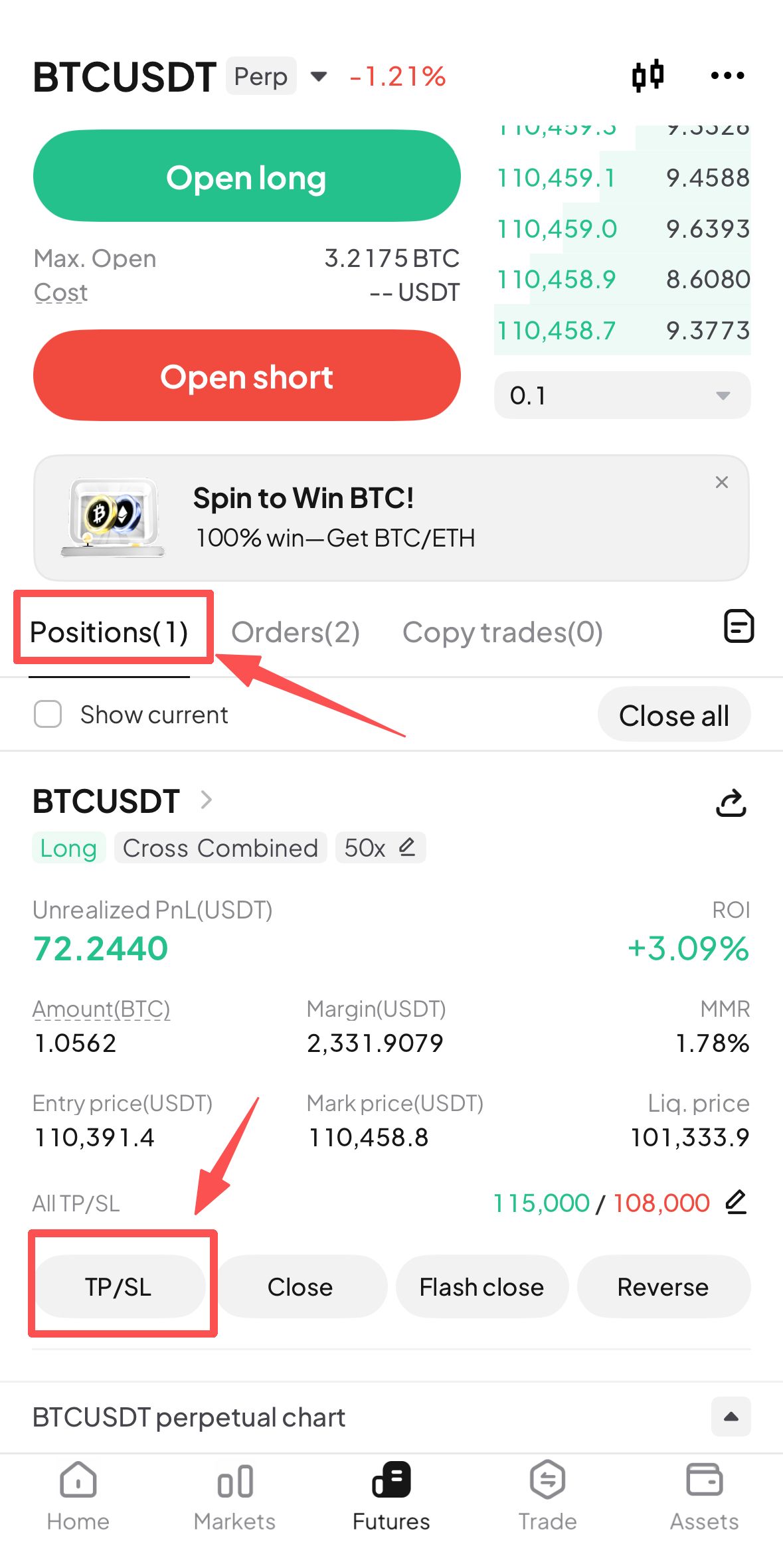
- After opening a futures trading order, users can find the "TP/SL" button in the Positions interface.
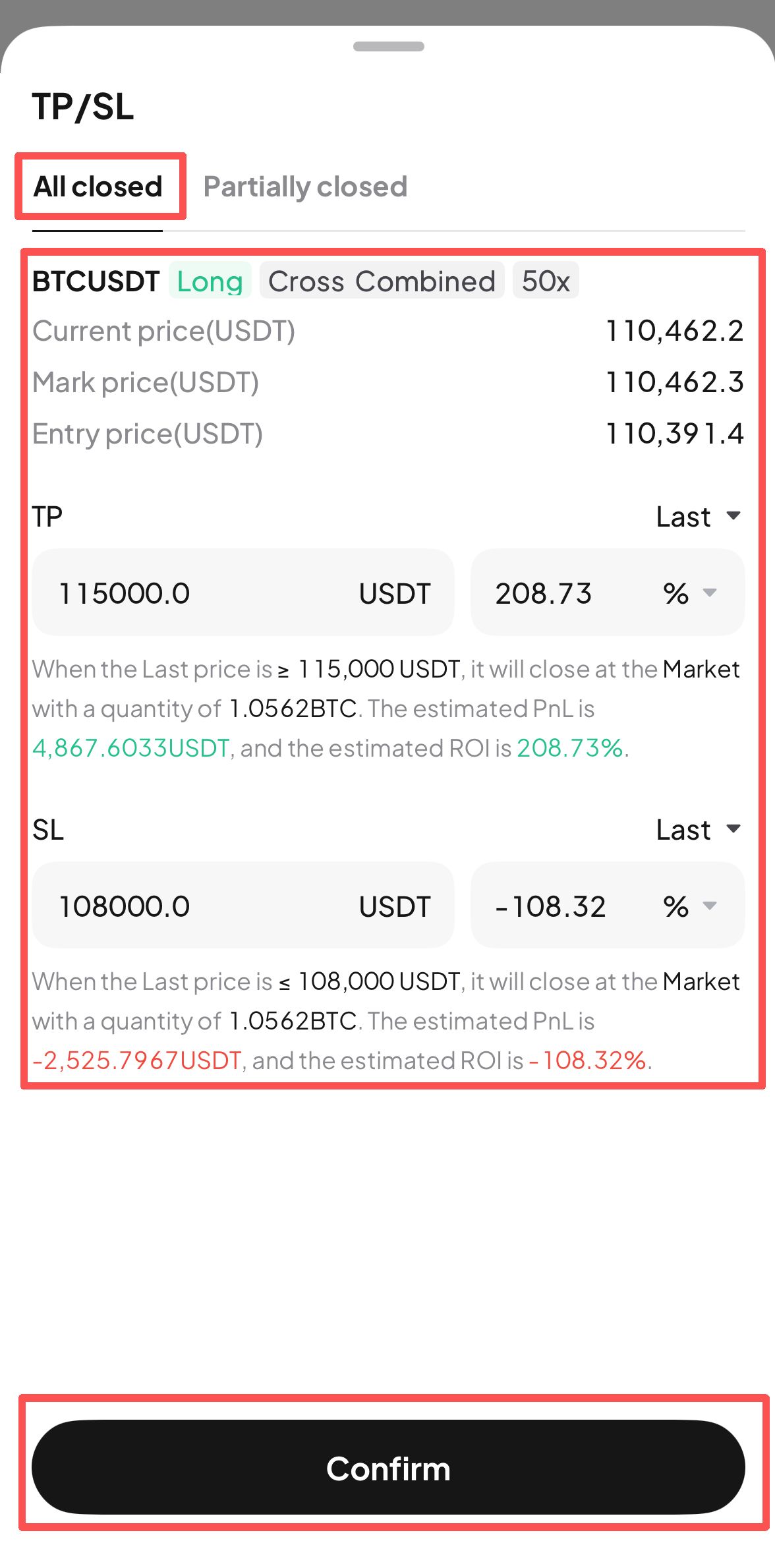
- Click the "TP/SL" button to enter the setup interface for the entire position take profit and stop loss. Users can fill in the take profit target price or stop loss target price based on their trading strategy, and click "Confirm" once completed.
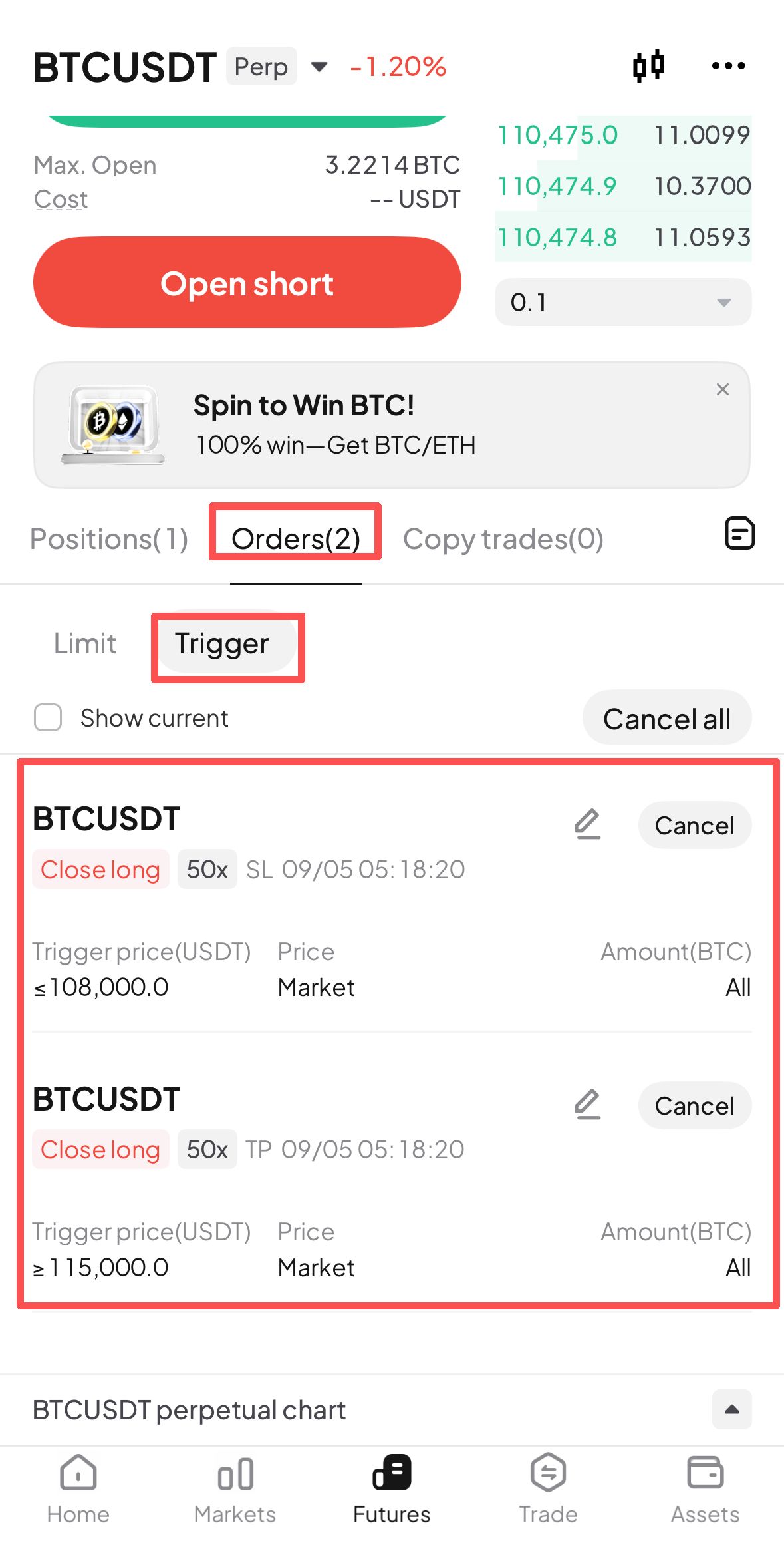
- After setting up the take profit/stop loss for the entire position, users can find the corresponding take profit/stop loss orders in the Trigger section of the Orders interface. When the asset price reaches the specified order price, the system will automatically execute a market order to close the entire position.
WEB:
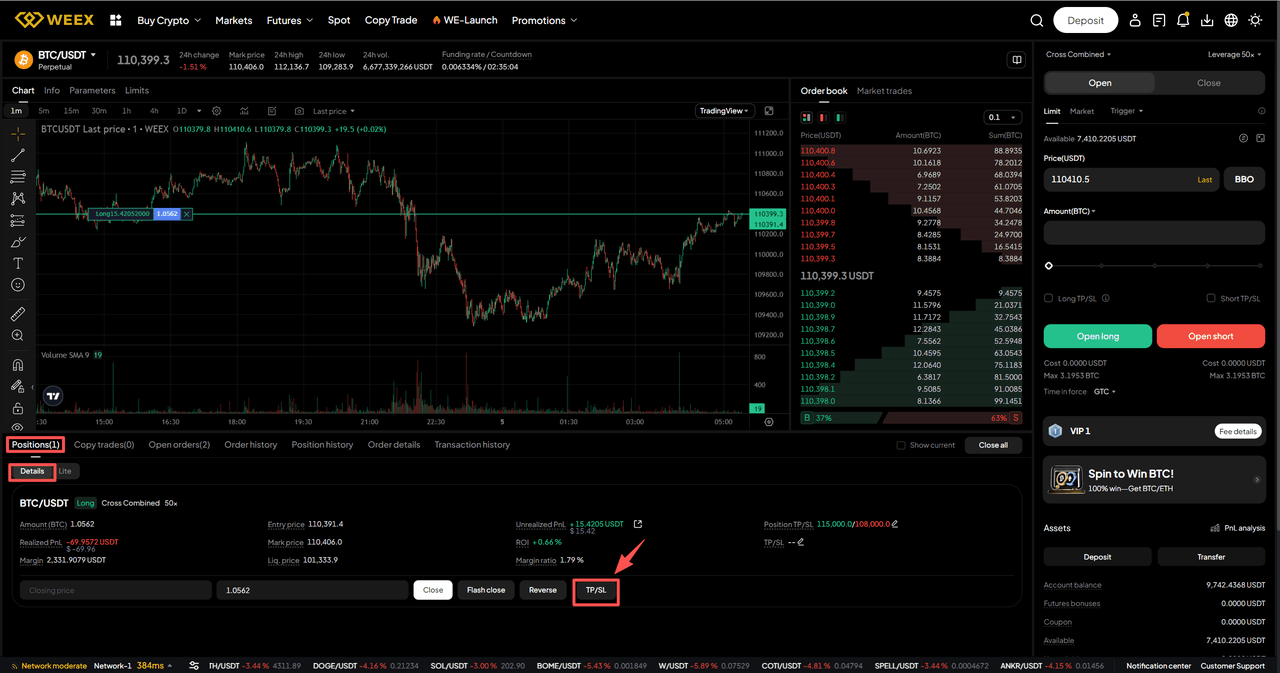
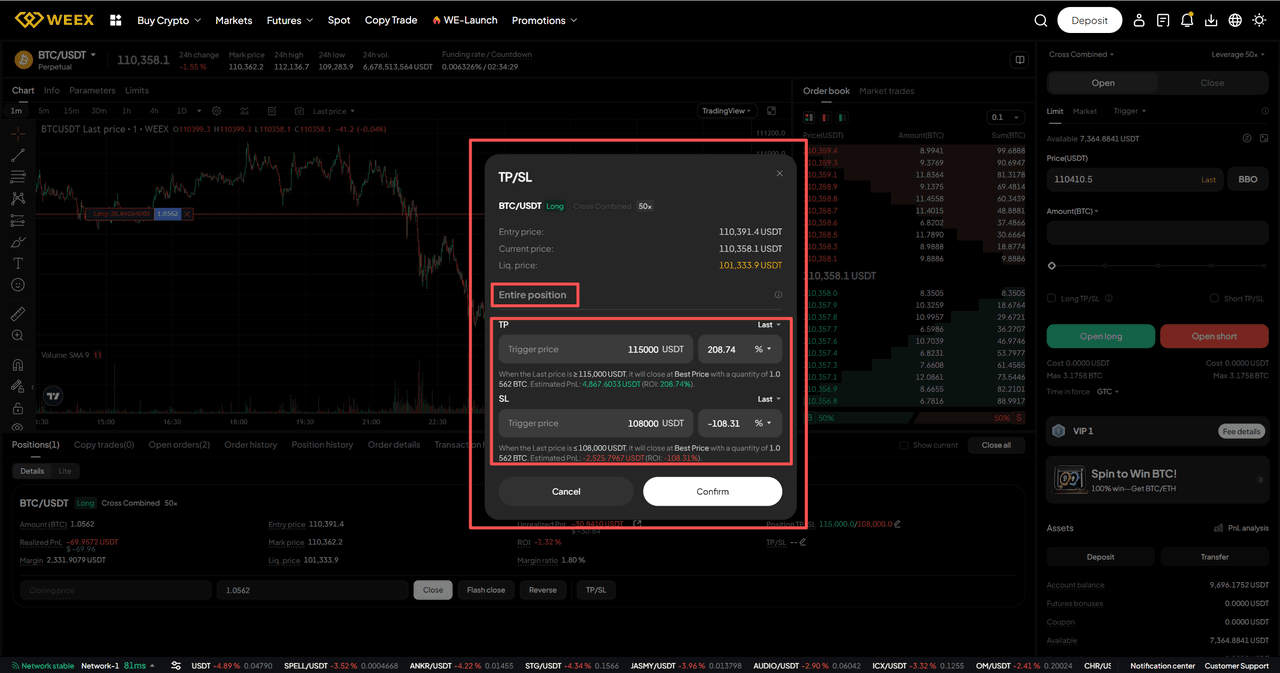
- After opening a futures trading order, users can find the "TP/SL" button in the Details section of the Positions interface.
- Click the "TP/SL" button to enter the setup interface for the entire position take profit and stop loss. Users can fill in the take profit target price or stop loss target price based on their trading strategy, and click "Confirm" once completed.
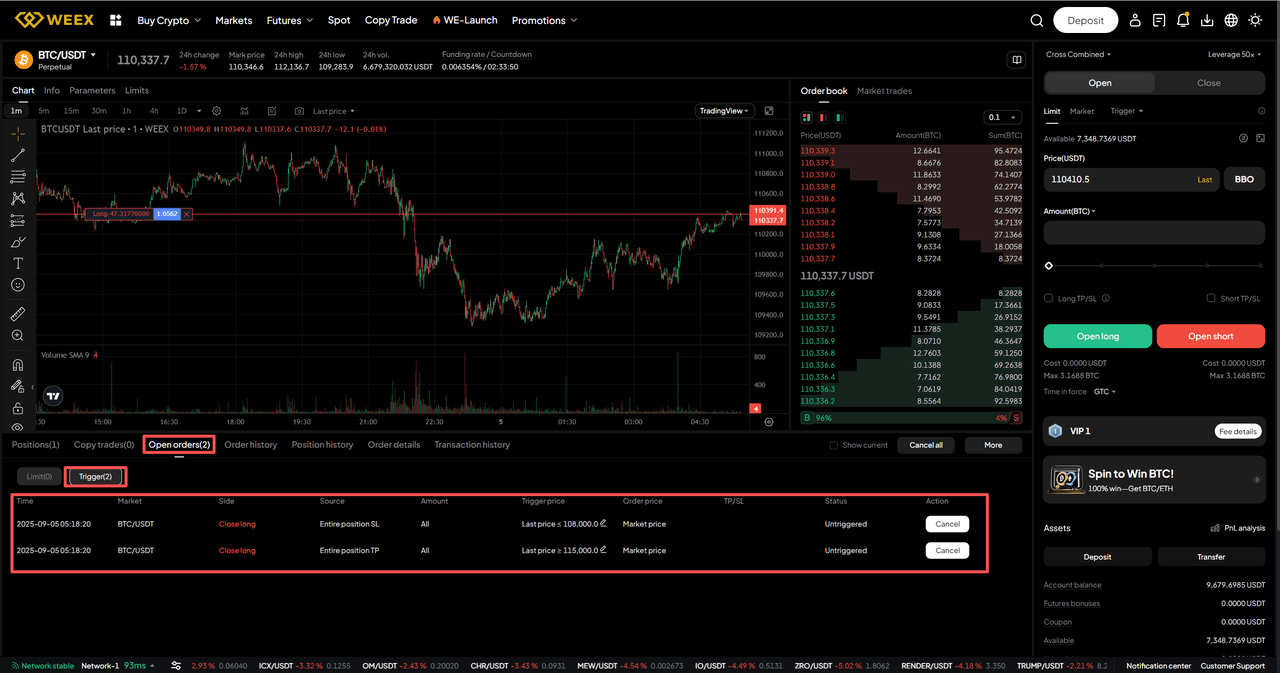
- After setting up the take profit/stop loss for the entire position, users can find the corresponding take profit/stop loss orders in the Trigger section of the Open orders interface. When the asset price reaches the specified order price, the system will automatically execute a market order to close the entire position.
Q&A
1. Do I have to set both take‑profit and stop‑loss?
No. You can set only a stop‑loss (cap worst loss), only a take‑profit (lock in expected gain), or both to define a fixed risk‑reward ratio.
2. Will it always fill exactly at my set price once triggered?
No guarantee. A trigger just means the condition is met; the system then sends a market close. The actual average fill can differ due to slippage, depth, and volatility.
3. Can I modify or cancel after setting it?
Yes. Open the position’s Take-Profit/Stop-Loss panel to adjust or remove. The latest submission overrides prior ones. If you’ve manually reduced part of the position, the remaining size keeps using the updated settings.
This content is provided for general informational purposes only and doesn't constitute financial, investment, legal, or tax advice. Any events, rewards, online promotions, or related information mentioned herein should not be considered a recommendation, solicitation, or invitation to purchase, sell, trade, or otherwise deal in any crypto assets. Crypto assets are highly volatile and may result in loss. The availability of WEEX services, products, and related events may vary by region. You are responsible for ensuring that your participation is in accordance with applicable local laws and regulations.
You may also like

Cathie Wood Nvidia Stock Purchase: What ARK's August Buys Show

PEP Stock Analysis: Why PEPon Trades Above PepsiCo Shares
SpaceX Stock Price Holds Near $141: Why Isn't a $100 Billion Spaceport Plan Moving It?

"我的女友景甜" Days Later: What Happened to the Viral Meme Coin

XST Coin Price Bounced 19% Off a New Low in Hours: Is This the Bottom or Just Noise?
Is NVDA Stock Overvalued After Record Q2 Earnings?

NVDA Stock Pulls Back After Earnings: Is $250 Still Next?

Salesforce Stock Price Targets Are Rising Fast: What Wall Street Actually Sees
MRVL Stock Price Target: Why Options Traders Bet on $300 Before Earnings

Marvell Stock (MRVL) Beat Earnings and Raised Guidance: Why Did It Fall Anyway?

What Is the WEEX Mini App? A Lightweight Way to Trade Inside Telegram
What Is CLAN? Is a Dump Coming After Its 100% Surge?
How to Evaluate a Crypto Exchange in Pakistan: A Practical Checklist for Traders
Which Crypto Exchange Offers the Widest Range of Assets for Pakistani Traders?

XST Coin Price Crosses Into Deep Capitulation Territory: What a 90%+ Decline Actually Signals
A Breakup Became "我的女友景甜" Token in Hours: What That Says About Crypto's Attention Economy
NVDA Stock Jumps 7% After Earnings: Is $250 Next?

PONS After 200% Rally: Overvalued or Still a Growth Story?
What Happened to Raini Studios Token? RST After the Game Shutdown
RST vs RAINI: Which Raini Studios Token Is Still Supported?
CYBERLINK or CYBERLEEK? Check the Ticker and Chain Before Trading

SEC Sends Crypto Custody Rule to White House: What the Review Means for Investment Advisers
SEC Crypto Custody Rules for Investment Advisers: A 2026 Guide
NVDA Earnings Call Recap: Revenue Guidance, AI Demand and Key Takeaways
Hamster Kombat Is Down 97% From Its Peak: What Happened to Crypto's Biggest Web3 Onboarding Experiment?
Nvidia Earnings Report Today: Did NVDA Beat Revenue and EPS Estimates?
Nvidia After-Hours Stock Price: What Moved NVDA After the Earnings Report?
Why Did Nvidia Stock Rise After Earnings? NVDA Results and Outlook
Did Nvidia Beat Earnings? NVDA Q2 Results and Stock Reaction Explained
No Official XST Announcement Explains the X2O Rebrand: What's Actually Confirmed
Cathie Wood Nvidia Stock Purchase: What ARK's August Buys Show
PEP Stock Analysis: Why PEPon Trades Above PepsiCo Shares
SpaceX Stock Price Holds Near $141: Why Isn't a $100 Billion Spaceport Plan Moving It?
"我的女友景甜" Days Later: What Happened to the Viral Meme Coin
XST Coin Price Bounced 19% Off a New Low in Hours: Is This the Bottom or Just Noise?
Is NVDA Stock Overvalued After Record Q2 Earnings?
Contents
Popular coins
Latest articles


