
One-Click Margin Mode Setup for All Futures Pairs

 Prefer us on Google
Managing multiple futures pairs shouldn’t feel like a chore.Yet switching margin modes one by one wastes time, breaks focus, and slows your momentum.That ends today.
WEEX now lets you apply your preferred margin mode to all futures trading pairs — with one click.
No more manual setup. No more repetitive toggles.
Just pure efficiency — so you can focus on trading, not settings.
This guide will introduce WEEX's supported margin modes, explain how to use the one-click setup feature, and address common questions.
Margin Modes Supported by WEEX
Cross Margin Mode
All positions share margins across the USDT-M futures account to prevent liquidation. In the event of liquidation, traders may incur losses on all positions and margins.
- Cross Combined Orders in the same direction (long or short) and for the same trading pair will be combined into a single position. In combined mode, you can only have up to two positions per trading pair: one long and one short. Leverage is uniformly applied, and all positions for the current trading pair share the same margin.
- Cross Separated Orders in the same direction (long or short) and for the same trading pair can open multiple positions. New orders will not be combined with existing positions. All positions under the current trading pair share the same margin.
Isolated Margin Mode
A certain amount of margin is allocated to the position. If the position margin falls below the maintenance margin, the position will be liquidated. In isolated margin mode, you can add or reduce the margin of positions.
- Isolated Combined Orders in the same direction (long or short) and for the same trading pair will be combined into one position. There are only two positions per trading pair: long and short. Leverage is uniformly applied, while margin is calculated separately for each position.
- Isolated Separated Orders in the same direction (long or short) and for the same trading pair can open multiple positions. New orders will not be combined with existing positions, and each position will have its own isolated margin.
How to Apply Margin Mode to All Futures Pairs
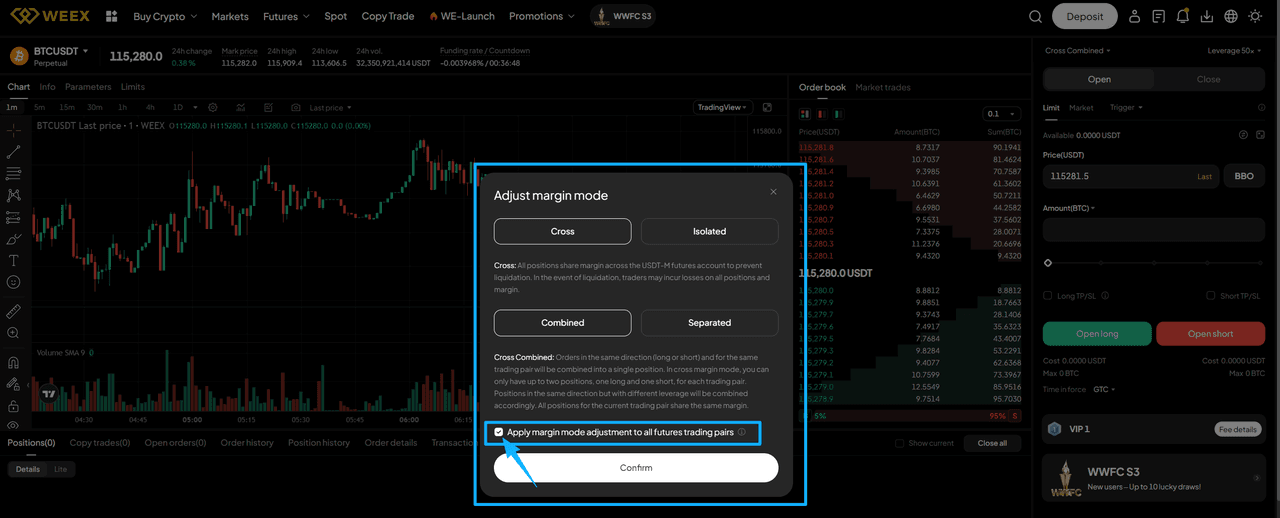
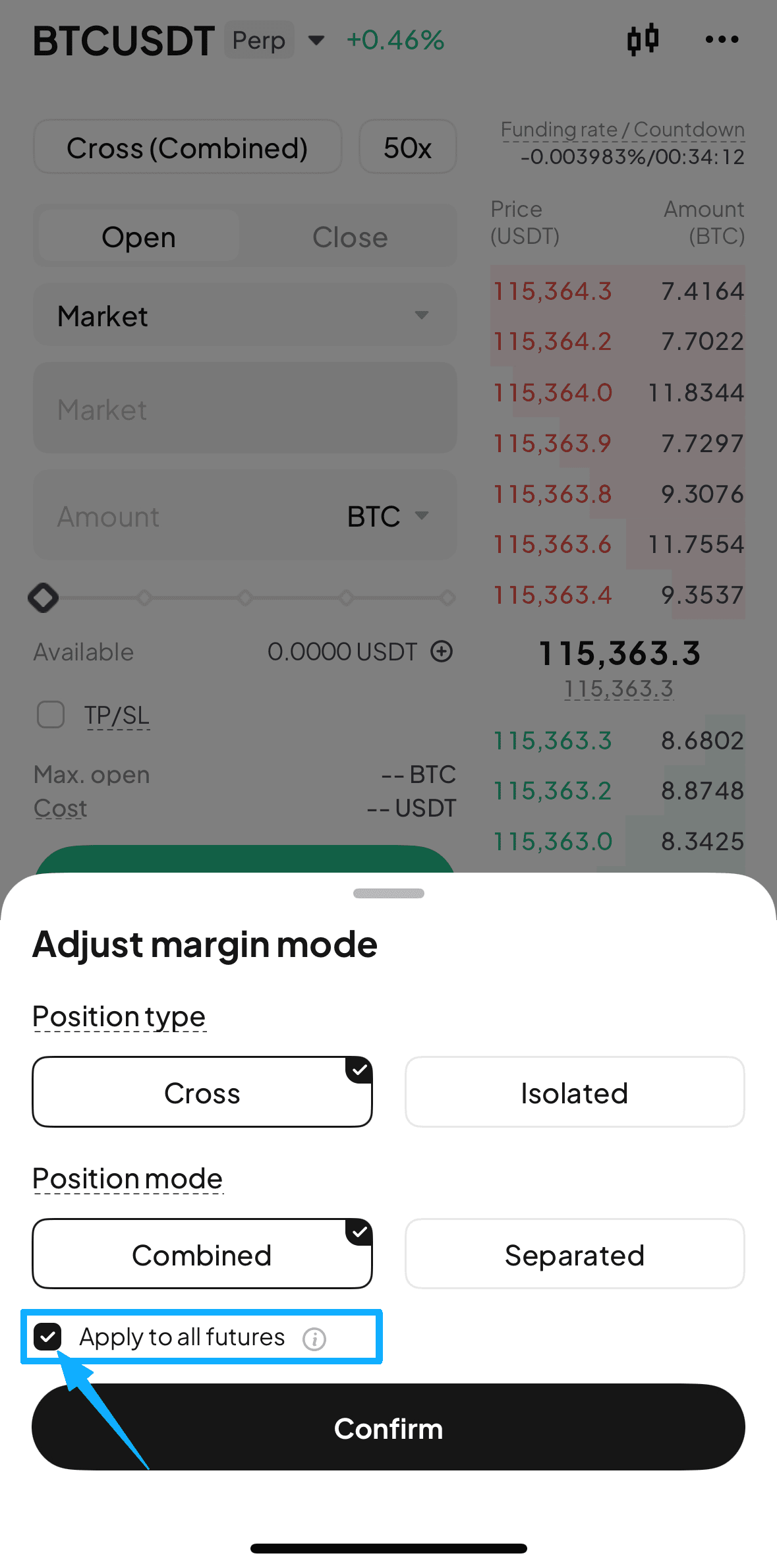
This batch setting feature allows you to apply your selected margin mode (Cross/Isolated/Combined/Separated) to all futures pairs at once by simply checking the "Apply margin mode adjustment to all futures trading pairs" option.
Web Platform
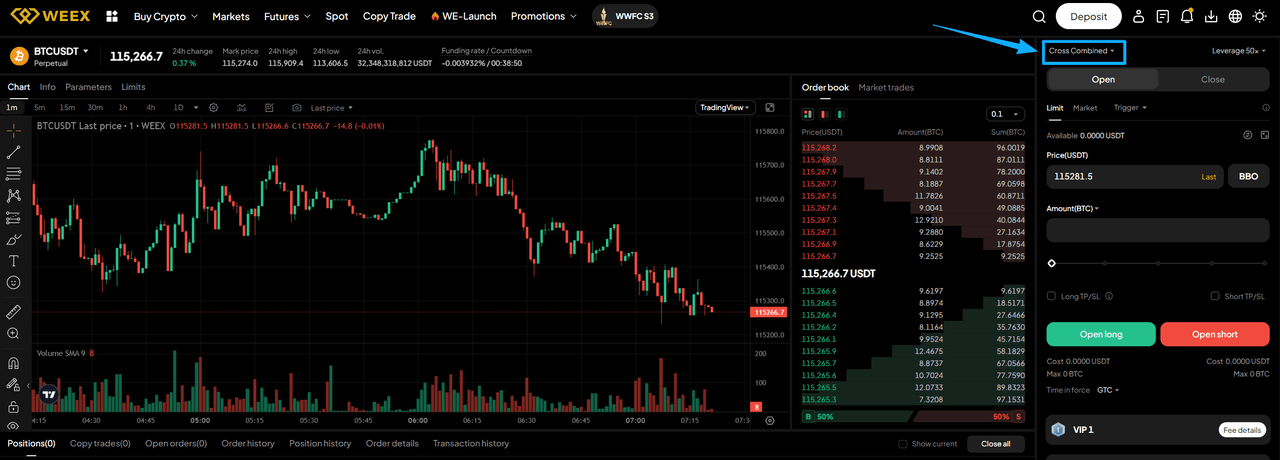
- Navigate to any futures trading page and click the Margin Mode button to open the "Adjust margin mode" window.
- In the "Adjust margin mode" window, select your preferred margin mode (Cross/Isolated/Combined/Separated), check the "Apply margin mode adjustment to all futures trading pairs" checkbox, and click "Confirm". The system will automatically apply the settings to all futures pairs (excluding pairs with open positions or pending orders).
Mobile App
- Go to the futures trading page and tap the Margin Mode button to open the "Adjust margin mode" window.
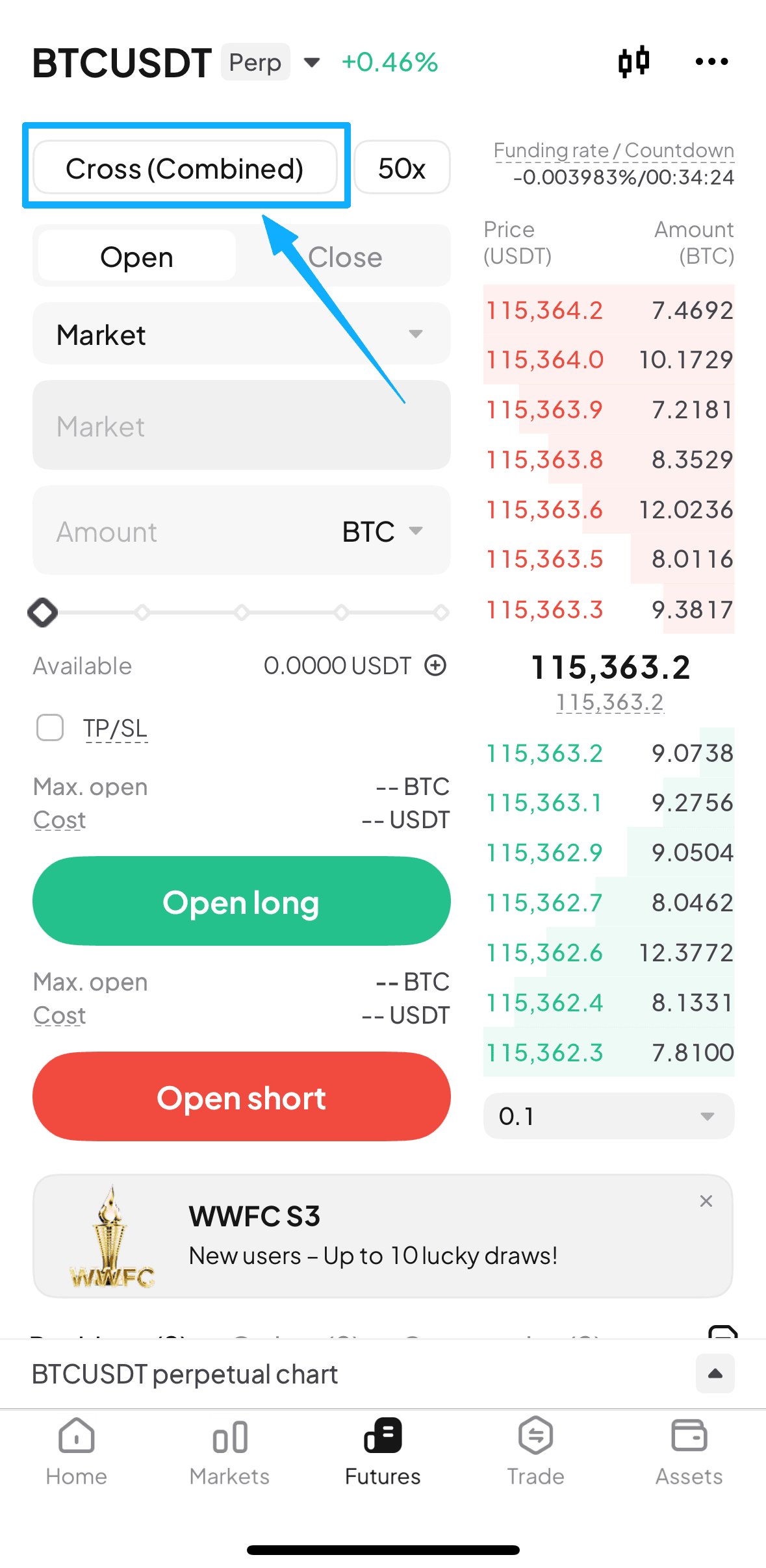
- Select your preferred margin mode (Cross/Isolated/Combined/Separated), check the "Apply to all futures" checkbox, and tap "Confirm". The system will automatically apply the settings to all futures pairs (excluding pairs with open positions or pending orders).
Q&A
1.Why didn't the margin mode change for some trading pairs?
Adjustment will not apply to futures pairs with pending orders or open positions. To protect your existing trades, please configure these pairs individually.
2.If I select Separated mode, will it apply to all futures?
If you select Separated mode, it will only apply to futures pairs that support it.
3.Can I change the settings at any time?
Yes, you can use this feature to reconfigure settings at any time. However, please note that new settings will only apply to pairs without open positions or pending orders.
Related Reads
More stories, more insights-follow WEEX's journey across the global crypto stage.
Follow WEEX on social media:
· Instagram: @WEEX_Exchange
· X: @WEEX_Official
· Tiktok: @weex_global
· Youtube: @WEEX_Global
· Telegram: WeexGlobal Group
-- Price
This content is provided for general informational purposes only and doesn't constitute financial, investment, legal, or tax advice. Any events, rewards, online promotions, or related information mentioned herein should not be considered a recommendation, solicitation, or invitation to purchase, sell, trade, or otherwise deal in any crypto assets. Crypto assets are highly volatile and may result in loss. The availability of WEEX services, products, and related events may vary by region. You are responsible for ensuring that your participation is in accordance with applicable local laws and regulations.
You may also like

What is BINANCELIFE (BINANCELIFE) Coin?

WEEX Trade to Earn Phase 2: Trade More but Pay Less in Futures Trading Markets

What is WEEX OTC and How to Buy SOL with HKD on WEEX OTC?

What is WEEX OTC and How to Buy DOGE with HKD on WEEX OTC?

What is WEEX OTC and How to Buy ETH with HKD on WEEX OTC?
What is WEEX OTC and How to Buy BTC with HKD on WEEX OTC?
What is WEEX OTC and How to Buy SOL with PLN on WEEX OTC?
What is WEEX OTC and How to Buy DOGE with PLN on WEEX OTC?

What is WEEX OTC and How to Buy SOL with USD on WEEX OTC?
What is WEEX OTC and How to Buy DOGE with USD on WEEX OTC?

What is Snowball (SNOWBALL)?
What is WEEX OTC and How to Buy SOL with EUR on WEEX OTC?
What is WEEX OTC and How to Buy DOGE with EUR on WEEX OTC?
What is WEEX OTC and How to Buy DOGE via WEEX OTC?
How to Grow Your Community with the WEEX Elite Bot

What is WEEX OTC Platform and How to Buy crypto with SEPA on WEEX OTC?
What is Crypto OTC Exchange and How to Buy ETH OTC with Dedit card on WEEX Platform?
What is Crypto OTC Exchange and How to Buy BTC with Dedit card on WEEX OTC?
What is WEEX OTC Platform and How to Buy USDT with SEPA on WEEX OTC?
What is Crypto OTC Exchange and How to Buy USDT with Dedit card on WEEX OTC?

What is Crypto OTC Exchange and How to Buy crypto with Debit card on WEEX OTC?
What is OTC Crypto Exchange and How to Buy crypto with PIX on WEEX OTC?
What is WEEX OTC and How to Buy USDT with PIX on WEEX OTC?
What is Crypto OTC Exchange and How to Buy ETH OTC with Credit card on WEEX?
What is OTC Crypto Platform and How to Buy crypto with Google Pay on WEEX OTC?
What is Crypto OTC Exchange and How to Buy BTC with Credit card on WEEX OTC?
What is OTC Crypto Exchange and How to Buy USDT with Google Pay on WEEX OTC?
What is Crypto OTC Exchange and How to Buy USDT with Credit card on WEEX OTC?
What is Crypto OTC Exchange and How to Buy crypto with Credit card on WEEX OTC?
What is Crypto OTC Exchange and How to Buy crypto with VISA on WEEX OTC?
What is BINANCELIFE (BINANCELIFE) Coin?
WEEX Trade to Earn Phase 2: Trade More but Pay Less in Futures Trading Markets
What is WEEX OTC and How to Buy SOL with HKD on WEEX OTC?
What is WEEX OTC and How to Buy DOGE with HKD on WEEX OTC?
What is WEEX OTC and How to Buy ETH with HKD on WEEX OTC?
What is WEEX OTC and How to Buy BTC with HKD on WEEX OTC?
Contents
Popular coins
Latest articles


